Updating Maps using Global Positioning Systems (GPS) - Principles and General Procedures
|
|
The following steps have to be performed in order to carry out a GPS-survey: 1. Acquisition of a GPS with sufficient accuracy Since the technology is developing rather fast, it is not possible to recommend a specific GPS model. It is worth comparing costs and the technical specifications in order to identify the most suitable GPS model needed for the task. 2. Setting the properties for the GPS (projection, map datum, coordinate units) In order to work with the same projection, map datum and coordinate units all relevant GPS data should be directly logged in the desired coordinate system (if the GPS supports this function). This avoids numerous sources of error throughout the entire GPS survey since it is no longer necessary to transfer coordinates at a later stage. 3. Defining map features and corresponding attribute information as well as the level of classification to be surveyed Before using a GPS the user has to be know how coordinates are logged in the field and how these can then be used for mapping purposes. The following questions help to guide the user during this process:
|
|
|
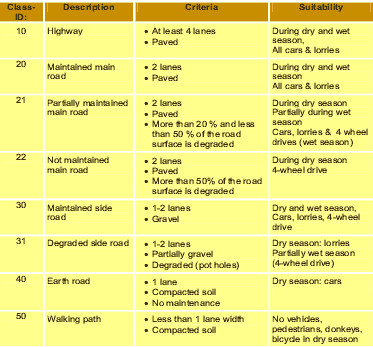
Table 1: Example of classification criteria
|
 |
Classification criteria can vary with regard to the level of detail of what should be depicted in a map. The higher the number of classes, the more time is required to find the right classification for a certain map feature. If a high number of classes exist, many criteria have to be defined in order to distinguish exactly between the neighboring classes. The optimum classification lies between “too generalized” and “too time-consuming”. Table 1 shows how classifications can be reduced to: 10: for Highways; 20-22: for Main roads, 30-31: for secondary roads, etc. 4. Collecting data with the GPS in the field During the survey, GPS coordinates can be logged in the field, while additional information has to be noted down synchronously. In general, the GPS stores in the memory a unique number according to one logged waypoint and its coordinates. However, the GPS does not know:
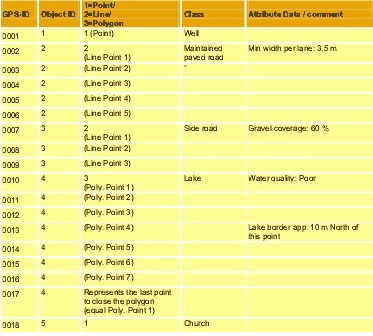
Therefore, forms should be prepared in order to collect all relevant additional information during the survey. However, the style of a GPS survey sheet depends largely on the required information. Basically, additional information is required to group single coordinates in lines or polygons. |
 |
Table 2: Example of a GPS survey sheet
5. Documenting the quality of digitized data and problems that occurred during the survey (e.g. distortion, inaccessibility of areas) As shown with point 0013 in table 2, it can be useful to measure points, which do not directly have the position of a desired map feature. 6. Transfer of raw GPS data into the computer Almost all GPS have additional cables or Infrared adapters to transfer the logged raw data onto the computer. The software is generally delivered with the GPS. Many useful tools can also be found and downloaded from the internet. 7. Convert the GPS data to the required coordinate system / projection system (Optional) If the GPS coordinate system has not been set up properly before the GPS survey, or the GPS only allows the user to store coordinates in a certain system, it can be useful to transfer the coordinate system after the raw data has been imported onto the computer. Many GPS software packages allow the user to recalculate the coordinates into other projection and/or coordinate unit systems. 8. Storing the GPS data into a suitable file format (DXF, AutoCAD, ARC/Info Coverage, etc.) In order to import the GPS coordinates into a GIS, the data has to be stored in pre-determined file format. The required file format depends on the import functions of the GIS software packages. The manuals and help files of the GIS software packages usually include compatibility information and they also show which file formats can be used for importing data. 9. Post-processing of map data in order to increase the accuracy of the collected waypoints Depending on the GPS being used, there are many ways to increase the accuracy of logged GPS coordinates. For example, data gathered from a second stationary GPS at a nearby location where the exact coordinates are known can be used to correct the logged data gathered by the handheld GPS used in the field. Another way of reducing the level of errors is to move logged points to known positions using satellite images or geo-referenced topographic maps. 10. Digitizing map features using the collected waypoint data and the documentation about the surveyed map features Lines and polygons can now be digitized onto GIS map layers on the basis of imported waypoint data and the additionally logged information (see table 2). 11. Entering classified attribute data to the GIS map features (attributes for the network, road level, diameters of pipelines…etc.). After establishing or updating map layers, additional information can be directly entered as attribute data according to the digitized objects. 12. Cross-checking and updating of survey data with existing map data or satellite images In view of the fact that satellite images or even older maps that only have a partial coverage of the area being surveyed often have a higher level of accuracy compared to many existing maps, the newly acquired GIS map data can be corrected using these sources of information in the GIS. 13. Documenting all technical procedures in order to refine the technique of map data acquisition with GPS In order to improve technical procedures and in order to assess the quality of the acquired data, it is important to document all technical procedures used to develop the new maps. This is especially important with regard to the approach used for exchanging data with other organizations or institutions. It is essential to carefully document exactly how the data was collected and classified. There are many different sources of error that can occur during a mapping process using GPS and GIS. This in turn can lead to poor or undesirable results as data is inaccurately presented in the maps. It is very important that the user is made aware of the quality and more importantly the accuracy of the data. |